went to check in on google glass (as one does) and they’ve already sunset the enterprise pivot death knell https://www.google.com/glass/
Mastodon
no
 Zach Leatherman 39 replies 9 likes1 repost Original on Mastodon
Update after one billable month: the 11ty Screenshots service cost $1.95 on AWS 🏆
1.16M screenshots served 👀
86.2% cache hits
Zach Leatherman 8 replies 28 likes3 reposts Original on Mastodonindependent of my well-being, rest assured that I am doing my best to ensure that your email never finds me
Zach Leatherman 4 replies 19 likes5 reposts Original on MastodonSaved the analytics data out of the @11ty/eleventy-fetch cache on my build server, so *pffft* 😛
Zach Leatherman 4 likes Original on MastodonUpdate: looks like my traffic spiked a bit and FaunaDB disabled my account and deleted my data from this project 😅
Glad I didn’t share this approach—I guess extortion is one way to upsell from the free tier :eyeroll:
Zach Leatherman 15 replies 9 likes2 reposts Original on Mastodonin iceland architecture you must only write in lavascript
Zach Leatherman 4 replies 20 likes1 repost Original on Mastodonlots of product managers using waterfall planning in iceland architecture
lots of Object.freeze immutability in iceland architecture
iceland architecture
Zach Leatherman 15 replies 6 likes1 repost Original on MastodonNew web component dropped: `<heading-anchors>`
Code: https://github.com/zachleat/heading-anchors
Blog: https://www.zachleat.com/web/heading-anchors/
Inspired by @DavidDarnes’s component of the same name and an excellent blog post by @ambrwlsn, this component adds and positions sibling anchor links for heading elements (h1–h6) when they have an `id` attribute.
Zach Leatherman 8 replies 17 likes6 reposts Original on MastodonRight to Repair: historically Nebraska Farmers versus John Deere and Big Tech (starring Apple and others)—and now a new challenger has appeared: the Military-industrial Complex.
Read more from @jasonkoebler on @404mediaco: https://www.404media.co/appliance-and-tractor-companies-lobby-against-giving-the-military-the-right-to-repair/
Zach Leatherman 10 likes7 reposts Original on MastodonIs it an okay practice to rely on `content: "#" / ""` for hiding garbage content from screen readers? Browser support looks relatively new so I am guessing it’s a no 😭
https://developer.mozilla.org/en-US/docs/Web/CSS/content#browser_compatibility
Zach Leatherman 3 replies 5 likes1 repost Original on MastodonFascinating talk from @feross on @cfedev today: The Dark Side of Open Source
https://www.youtube.com/watch?v=hlLnFJSX0YY
Especially enjoyed the Q&A portion, really great stuff. One thing I keep coming back to is that when the lead maintainer changes, it should have some formal release process around it—maybe even to the point of it being a semver breaking change that requires a major release for updates (though I understand that’s a bit extreme too)
Zach Leatherman 2 replies 10 likes3 reposts Original on MastodonLive on @OddBird’s Winging It in about 10 minutes with @mia and @Jamessw—talking about web components!
Zach Leatherman 7 likes3 reposts Original on MastodonFound a pretty hefty blog post about concurrency benchmarks using the Nginx web server.
https://blog.nginx.org/blog/testing-the-performance-of-nginx-and-nginx-plus-web-servers
Looks like the slowest metric (1 CPU, HTTPS) handled 428 connections per second.
Zach Leatherman 6 replies 5 likes2 reposts Original on MastodonFor those managing servers: what kind of concurrent request count spikes do y’all prepare for?
Looks like the Locust load testing tool’s “first test” starts with 100 concurrent users: https://docs.locust.io/en/stable/quickstart.html
Looks like there has been a fair bit of discussion about the architecture of Mastodon previews and “DDoS-ing” web sites:
1️⃣ https://flipboard.social/@coffeegeek/113030436873628885
2️⃣ https://news.itsfoss.com/mastodon-link-problem/
3️⃣ https://kevquirk.com/blog/mastodon-is-ddosing-me
4️⃣ https://michaelnordmeyer.com/on-mastodon-ddosing-sites
While clearly there is room for improvement there, it’s worth noting that Jamstack architecture and static sites sidestep this issue nicely (by making it someone else’s problem 😅).
Zach Leatherman 32 replies 17 likes3 reposts Original on Mastodonivermectin static regeneration
cc @DavidDarnes and @ambrwlsn who might be interested in this! https://github.com/11ty/eleventy-base-blog/blob/dc5ab2ef6372de744be5484ada4958a4342073ea/public/js/heading-anchors.js
#1 superfan of the CSS Anchor Positioning API: https://developer.chrome.com/blog/anchor-positioning-api
Used it to implement more accessible heading anchor links on `eleventy-base-blog` using sibling elements without a wrapper element 🏆
You can see it in action here: https://eleventy-base-blog-git-v9-11ty.vercel.app/blog/thirdpost/ (Chrome and Edge support this, falls back to a nested link in other browsers)
Zach Leatherman 7 replies 23 likes6 reposts Original on MastodonI’m going to be speaking at Web Unleashed in Toronto (October 2024)! See you there?
https://fitc.ca/presentation/the-best-and-worst-parts-of-eleventy-now-in-v3/
Zach Leatherman 4 replies 8 likes4 reposts Original on MastodonBigger phones are better
Bigger vehicles are better
Even larger language models
Even more JavaScript
Bigger data centers slurping more energy
More servers
More serverless
More
More
More
Excess
We need more
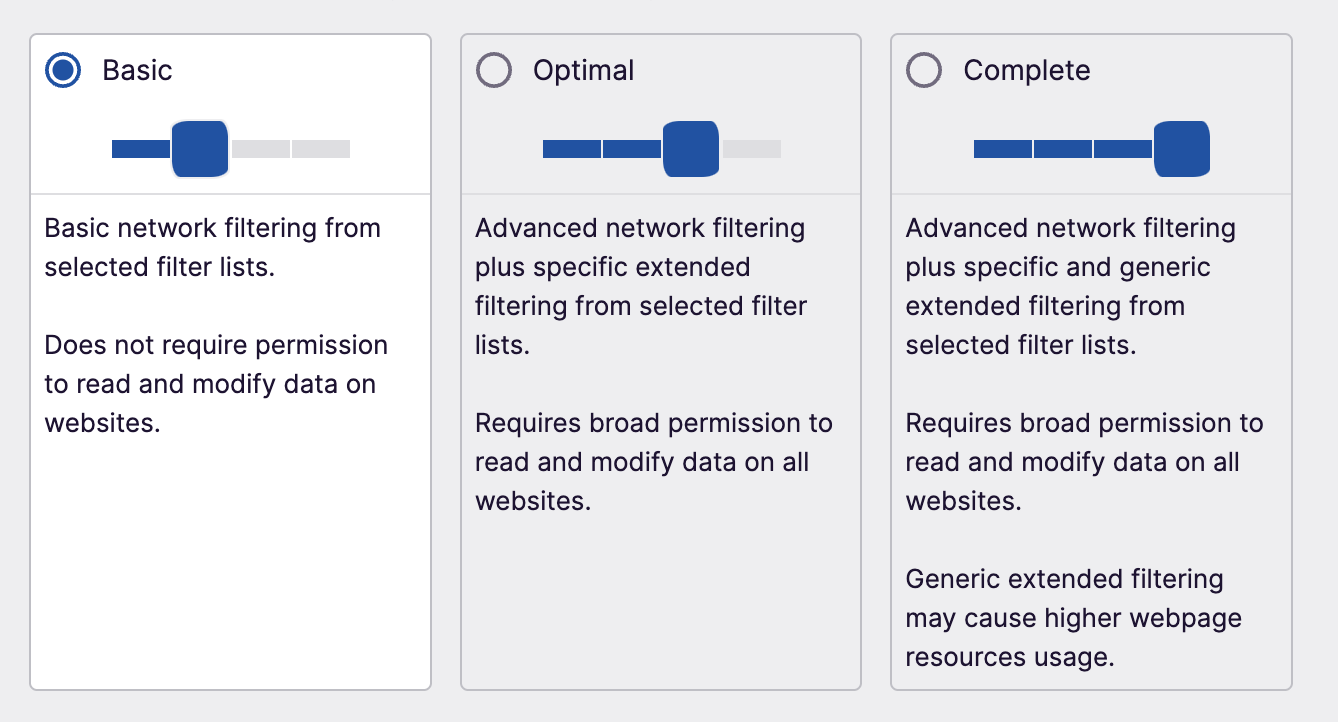
Zach Leatherman 40 replies 35 likes13 reposts Original on MastodonCorrection to this post after playing with uBlock Origin Lite for a bit—it does *not* require per-site opt-in, defaults to a Basic limited permissions filtering mode:
Here’s a little bit better view of the Kerið volcanic crater lake: https://en.wikipedia.org/wiki/Keri%C3%B0

Zach Leatherman 2 replies 30 likes1 repost Original on MastodonGreetings from inside the crater of a dormant volcano in Iceland 🇮🇸

Zach Leatherman 13 replies 82 likes1 repost Original on MastodonThankful for this wonderfully comprehensive blog post on Accessible Heading links from @ambrwlsn today https://amberwilson.co.uk/blog/are-your-anchor-links-accessible/
Zach Leatherman 4 replies 12 likes10 reposts Original on MastodonUnfortunately Google seems to be fully locked into an austerity phase now.
Looking back on this post a little differently now: https://support.ublock.org/hc/en-us/articles/11749958544275-Google-s-Manifest-V3-What-it-is-and-what-it-means-for-uBlock-Users
Look’s like the ol’ Extension Manifest v3 rollout is finally coming to a head (as it were):
https://github.com/uBlockOrigin/uBlock-issues/issues/3309
Looks like the path forward forces uBlock Origin users on Chrome to swap to a new extension that requires opt-in to content filtering on a per-site basis: https://github.com/uBlockOrigin/uBOL-home
Zach Leatherman 11 replies 8 likes7 reposts Original on Mastodon@baldur gonna be in your neck of the woods next week! If you have any off-the-beaten path recommendations I would love to hear them!
today’s search query: am I midwest princess
A web site that is only readable via screen reader.
Zach Leatherman 17 replies 25 likes4 reposts Original on MastodonFound some stats:
28.8% cache hits on Vercel 😬
81.2% cache hits on CloudFront
Zach Leatherman 4 replies 14 likes Original on Mastodona more cynical take on “Lottery factor” might recognize the turnstile of unpaid and underpaid open source maintainers and think that incentivizing adding *more* people to churn through the turnstile is actually not a good thing
When thinking about the “Lottery factor” of an open source project you must take into account the difference between paid and unpaid labor.
I’d argue that 1 paid dev is worth more than 2 unpaid devs. To further complicate things the other side of the coin is that 10 paid devs burning VC runway is worth… you know what—actually I should probably just stop there.
Zach Leatherman 7 replies 17 likes2 reposts Original on Mastodon❌ div soup
✅ div slop
Zach Leatherman 3 replies 10 likes1 repost Original on Mastodon📮 New blog post:
The Sneaky Costs of Scaling Serverless
https://www.zachleat.com/web/serverless-cost/
Chronicling the *wonderful time* I had migrating the beefy 11ty Screenshots API to a new hosting provider.
Zach Leatherman 60 replies 54 likes27 reposts Original on MastodonOriginal on Blueskycan you believe that there are people out there making huge life decisions without first making a spreadsheet? wild
Zach Leatherman 8 replies 27 likes2 reposts Original on MastodonWhoa, this is big news: nunjucks4 is a fully-async rewrite/revival of Nunjucks: https://mastodon.social/@jameswragg/112914191470870251
via @jameswragg
Zach Leatherman 4 replies 25 likes5 reposts Original on MastodonI made a little chart comparing how a few different hosts charge for serverless execution time (normalized to hours of usage) and the vCPU default can cost you a lot of unnecessary money if you’re not paying attention!
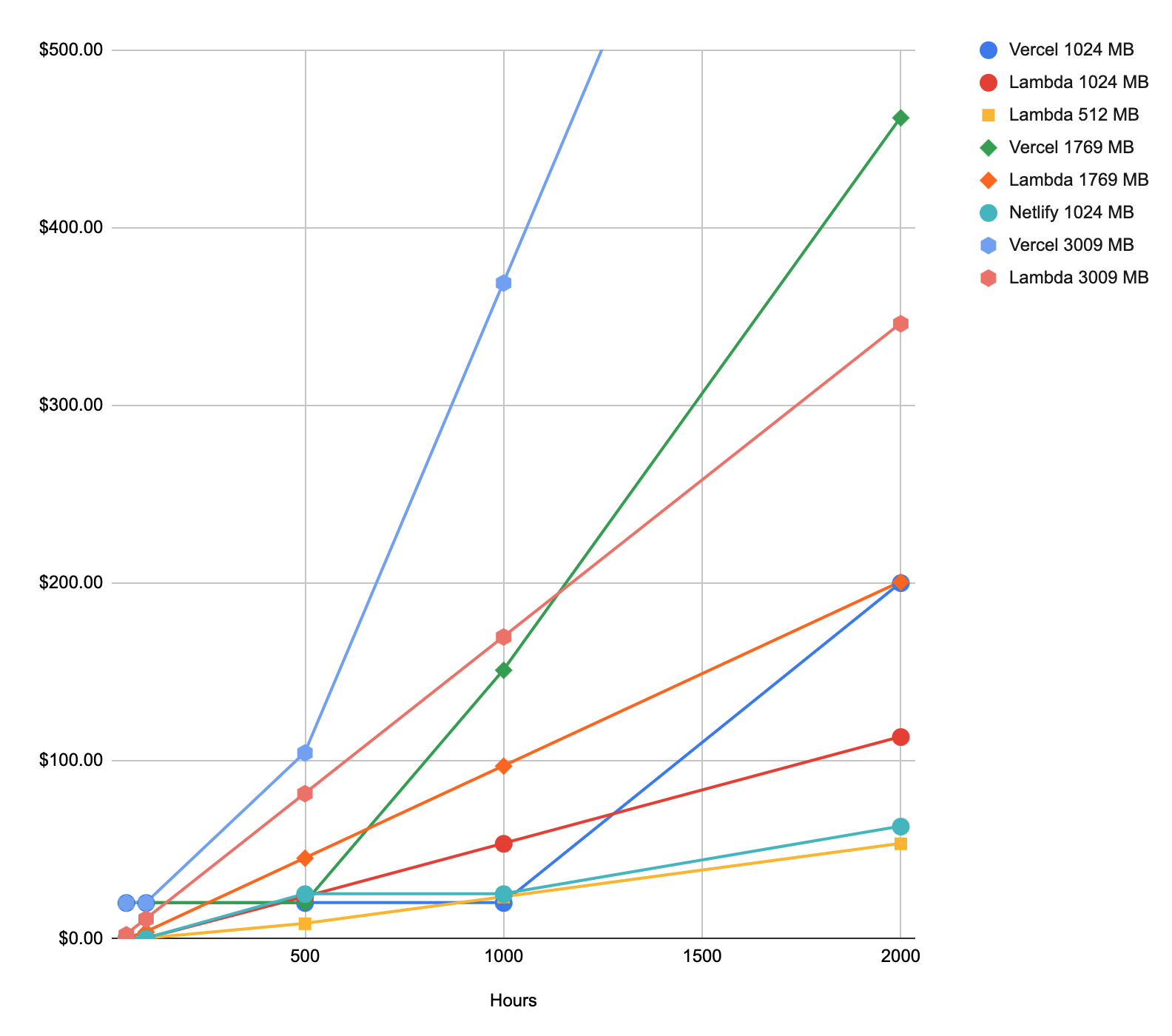
Zach Leatherman 2 replies 16 likes4 reposts Original on MastodonLooks like the default changed in April of this year: https://vercel.com/changelog/faster-defaults-for-vercel-function-cpu-and-memory
TIL about Vercel’s Pro Tier:
1 vCPU (default) = 1.72 GB memory
The UX of the GB-Hrs metric for usage pricing feels a bit like a dark pattern to me (given that default).
For example, the 1000 GB-Hrs of included execution time is 581 hours (using 1 vCPU). Overages advertised at $0.18/GB-Hr are $0.31/hour (using 1 vCPU).
Gonna change my stuff there to use 0.6 vCPU (since they’re services, not SSR): https://vercel.com/docs/functions/configuring-functions/memory#setting-your-default-function-memory-/-cpu-size
Zach Leatherman 15 replies 5 likes2 reposts Original on Mastodoninspired by this @glitchdotcom project: https://mastodon.social/@glitchdotcom/112910252389116863
Zach Leatherman 8 likes2 reposts Original on Mastodon
Zach Leatherman 10 replies 25 likes5 reposts Original on Mastodonwhat’s the name for road rage, but on social media
Zach Leatherman 16 replies 5 likes1 repost Original on Mastodonit’s been 3 days since @philhawksworth announced he was on the market and let’s be honest: the most productive thing you could be doing right now is sliding into his DMs with a job offer
Zach Leatherman 4 replies 13 likes3 reposts Original on Mastodonmy son (age 7) just referred to pants as long-sleeve shorts and I am so proud right now
Zach Leatherman 7 replies 81 likes10 reposts Original on MastodonWorth noting that Netlify’s On-demand Builders provide global persistence across all edge nodes: https://www.netlify.com/blog/2021/10/25/faster-more-reliable-page-loads-with-update-to-on-demand-builders/
Alternatively, CloudFront has 13 Regional Edge Caches that (in my tests with a VPN) seem to be segmented too: https://aws.amazon.com/cloudfront/features/?whats-new-cloudfront.sort-by=item.additionalFields.postDateTime&whats-new-cloudfront.sort-order=desc
CloudFront also offers an Origin Shield product that appears to provide a similar feature but I have not enabled it: https://docs.aws.amazon.com/AmazonCloudFront/latest/DeveloperGuide/cache-hit-ratio.html#cache-hit-ratio-use-origin-shield
A few things here: Vercel’s Edge Network cache is segmented into 18 regions. Further, the cache eviction policy is “best-effort” and assets may be evicted before they’re stale: https://vercel.com/docs/edge-network/caching#limits
I suspect I was getting very few cache hits—not ideal at all for a screenshots service (or any resource intensive serverless function?). I wanted those images to request once and cache for as long as possible.
Preliminary comparisons with Netlify, Vercel, and AWS Lambda+Cloudfront suggest that Vercel is *drastically* overcounting serverless invocation amounts. I suppose it’s possible that I misconfigured something but Netlify was like 4h/day, Vercel was 42h/day and this new AWS setup is looking like it’s going to weigh in at 2h/day?
Alarm bells are going off over here.
Zach Leatherman 26 replies 15 likes2 reposts Original on Mastodonlook—did I yolo this to production in the same day that I learned how to do it? yes, yes I did
vercel rewrite -> cloudfront -> api gateway -> aws lambda function is running the 11ty screenshots API now 👀
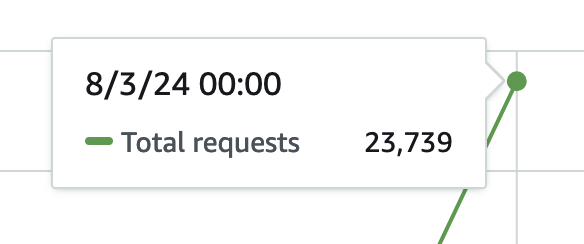
Today I learned how to deploy my own serverless function with a heavy caching layer using AWS Lambda (with a Layer for large dependency reuse), API Gateway, and CloudFront.
I am an enterprise developer now.
Zach Leatherman 51 replies 45 likes1 repost Original on Mastodonquote posts/toots are like toilet water—they’re great for flushing quick thoughts but terrible when the splashback hits you
Zach Leatherman 11 likes2 reposts Original on Mastodonin the immortal words of steffi graf: have you heard of our sustainability fundraising initiative https://www.11ty.dev/blog/sustainability-fundraising/
Zach Leatherman 6 replies 5 likes4 reposts Original on Mastodonfirst marriage proposal because of @eleventy so you could say things are getting *pretty* serious: https://indieweb.social/@bobmonsour/112893676626086346
Zach Leatherman 7 replies 35 likes2 reposts Original on Mastodonin order to use that file from your bucket in your lambda as a layer it needs to be in the same aws region, sure.
the one thing we know for sure is that servers are not allowed to communicate outside of their municipality
Zach Leatherman 6 replies 8 likes1 repost Original on Mastodonin order to upload a file to amazon you need to create an s3 bucket, sure.
the one thing we know for sure is that uploads over 10MB will tax the amazon upload process beyond scalable comprehension
current status: learning how to deploy a serverless function directly to aws lambda to save money 😅
“no one wants to be a third wheel” is a anti-tricycle propaganda
Zach Leatherman 21 replies 18 likes5 reposts Original on Mastodon@jenn Eleventy 3.0 is imminent and is Node 18! I’m curious how much this will cause y’all issues at Glitch—y’all are still on Node 16 max, right?. I’ve done a little work to see if we could at least support 16+ on core and it seems like it wouldn’t be too big of a deal: https://github.com/11ty/eleventy/pull/3378
I’m just curious as to your take on it—should I bother with this or no?
@rem did you already lock down that web components talk for ffconf? I might be interested but don’t want to step on any toes if someone is already in the pipeline
my dog would *never*
I always lock my computer when I get up from my desk because of the greatest operational security threat facing my workspace: cats walking or sitting on the keyboard
Zach Leatherman 9 replies 48 likes9 reposts Original on MastodonJust an update here: I can verify that it’s safe to restore Node 22.x to your test suites on GitHub Actions
Zach Leatherman 3 likes2 reposts Original on MastodonMaking careful note of the incentives of a hosting company investing in AI as they also simultaneously charge for bandwidth and traffic: https://front-end.social/@stefan/112863640599785389
Zach Leatherman 2 replies 26 likes12 reposts Original on MastodonIf we can agree that browser fingerprinting is bad, we should be able to agree that third-party cookies are also bad.
There is consensus amongst browser-makers that fingerprinting is a bad thing, right?
…right?
Zach Leatherman 28 replies 32 likes5 reposts Original on Mastodonmake it work
make it right the same
make it fast slower
Zach Leatherman 6 replies 11 likes Original on MastodonRefactoring working JavaScript code to satisfy limitations in TypeScript.
Everything is fine.
I am being productive.
This is productivity.
Zach Leatherman 26 replies 36 likes11 reposts Original on Mastodon@janl is CouchDB gonna weigh in on the JD Vance thing? 🫣
Zach Leatherman 9 replies 22 likes Original on MastodonOH “dung beetles are professional turd burglars”
I’m not sure how typescript got crowdstrike’d into my list of things to do today
TypeScript TIL: `compilerOptions.noResolve: true` will also make all of your explicitly listed `compilerOptions.types` disappear.
So even with `"types": ["node"]` you’ll still get errors that complain about clearly installed types.
> Cannot find name 'process'. Do you need to install type definitions for node? Try `npm i --save-dev @types/node` and then add 'node' to the types field in your tsconfig.
Everything is fine.
Some good points about venture capital backed open source from @Colman here: https://mastodon.ie/@Colman/112840985325704306
I’d also add that small scale closed source and venture capital backed open source aren’t the only two options.
Zach Leatherman 3 replies 12 likes4 reposts Original on Mastodon📮 A new blog post about how I used the Conditional Exports feature in Node.js to improve the error messaging when someone tries to require("@11ty/eleventy") in Eleventy 3.0 (written in ESM)
Zach Leatherman 15 likes6 reposts Original on MastodonOriginal on BlueskyListening to Jesse Welles. https://tidal.com/browse/artist/15803343 Payola, Cancer, The Olympics, War Isn’t Murder, and Whistle Boeing are all great tracks.
Zach Leatherman 4 replies 2 likes1 repost Original on Mastodonthing becomes popular because it’s free to use ♻️ popular thing goes away because it’s now too expensive to run
Zach Leatherman 4 replies 14 likes2 reposts Original on Mastodoneverybody has a plan until they {get punched in the mouth, scale beyond the host’s free tier}
Zach Leatherman 6 replies 29 likes3 reposts Original on MastodonI spent too much time here trying to use “bootloaderlicker” and gave up—someone else can use it 😅
last week proved that even without a union the computers can still crowdstrike
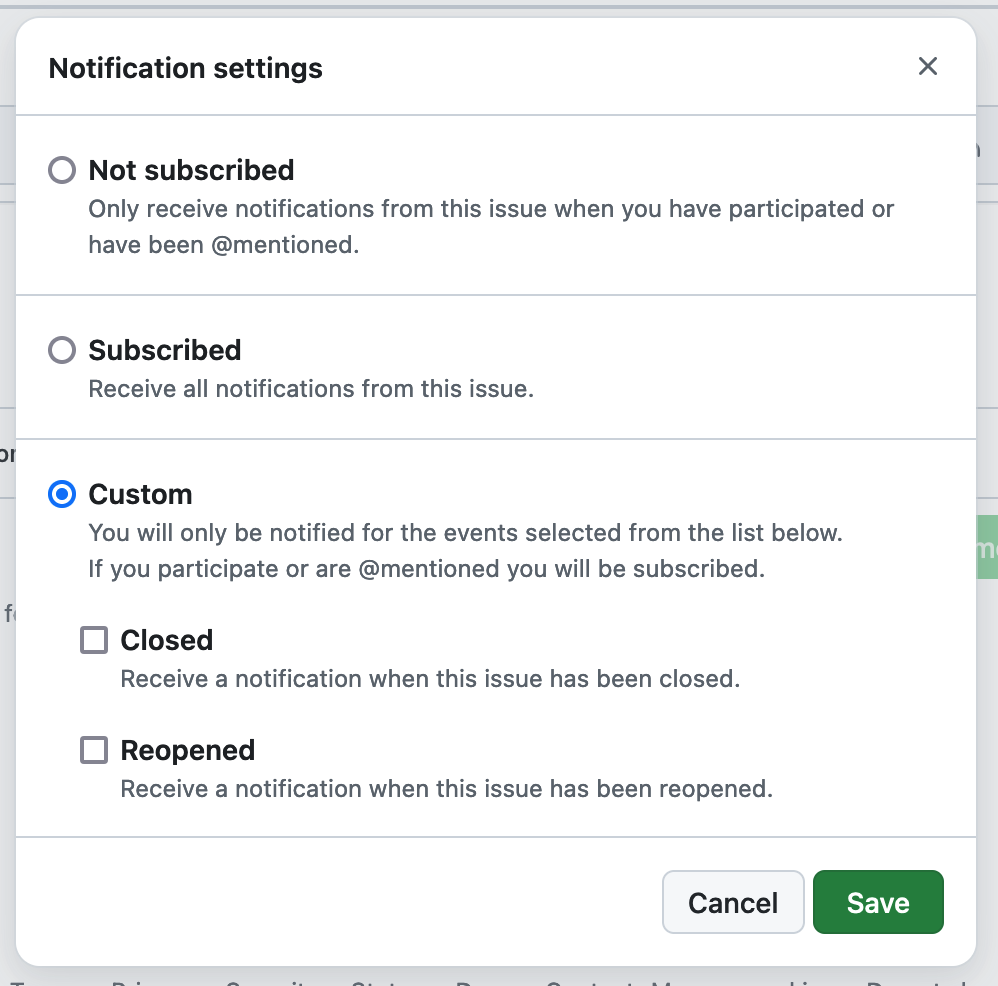
Zach Leatherman 5 replies 19 likes3 reposts Original on MastodonWould be nice to have an option in GitHub Issues notification settings to know when a maintainer comments. It would allow subscribing but skip drive-by comments from everyone else.
Zach Leatherman 8 replies 58 likes11 reposts Original on MastodonJust stumbled across a 1.2 MB SVG favicon in the wild 😅
Zach Leatherman 25 replies 32 likes1 repost Original on MastodonOf these hosts—what are y’all using, primarily? (If other, please reply!)
Zach Leatherman 45 replies 4 likes10 reposts Original on MastodonWow, just learned that Google Photos is actively generating `goo.gl` share URLs.
Edit: it’s possible this URL will be unaffected, as the original blog post notes the retirement of `https://goo.gl` links. However, I do have Google Photos shared albums currently using `https://goo.gl` links, so 😬🤷
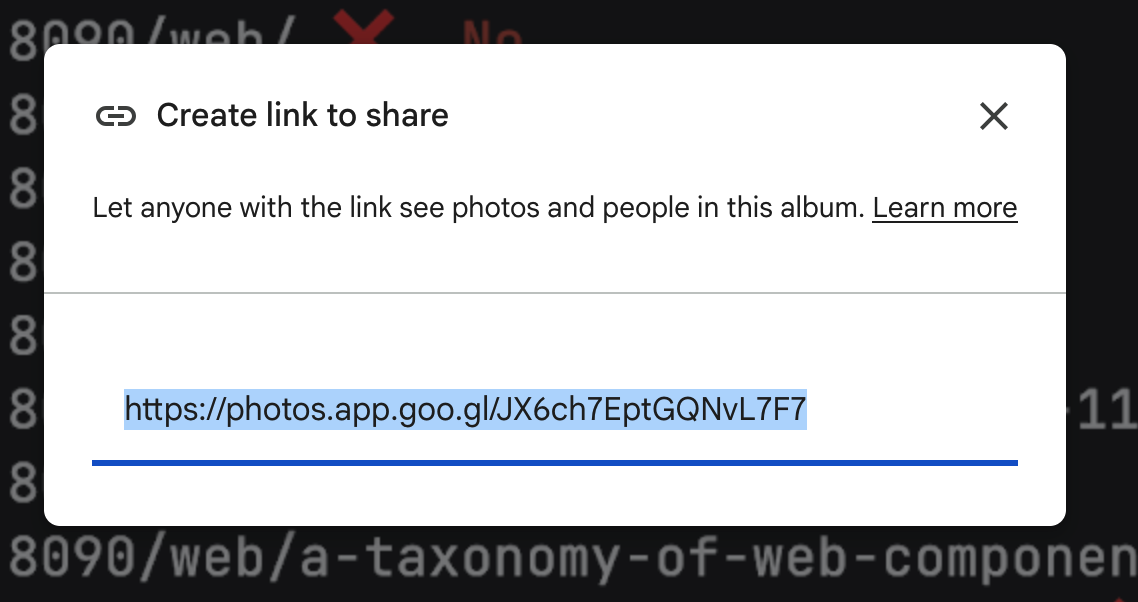
Zach Leatherman 3 replies 13 likes2 reposts Original on MastodonGenuinely upset at the retirement of Google’s URL shortener, goo.gl.
https://developers.googleblog.com/en/google-url-shortener-links-will-no-longer-be-available/
Just to be clear, this will break a large portion of the web for what seems to be a marginal cost savings. So many Google decisions—including the recent sale of Google Domains—have us asking why? Who’s making the decisions over there?
Zach Leatherman 16 replies 52 likes31 reposts Original on Mastodonis anyone interested in trying my new C-00000291*.sys plugin for eleventy
Zach Leatherman 10 replies 50 likes10 reposts Original on MastodonIf your GitHub Actions are failing right now (specifically on Node 22), here are the GitHub issues you may be interested in subscribing to:
https://github.com/npm/cli/issues/7672
https://github.com/actions/setup-node/issues/1112
https://github.com/actions/node-versions/pull/182
Zach Leatherman 9 replies 8 likes4 reposts Original on Mastodonwhy can’t chatgpt just fix it
Zach Leatherman 10 replies 54 likes29 reposts Original on Mastodonhere’s a good idea that I think should exist:
a job board for non-react front end jobs
Zach Leatherman 24 replies 164 likes41 reposts Original on MastodonI have immediately hit my quota for reading feedback today please come back tomorrow
Zach Leatherman 21 likes1 repost Original on Mastodonjust read some feedback that the 11ty docs need “more foreplay” and my dear friend let me tell you about the miracle of touching grass
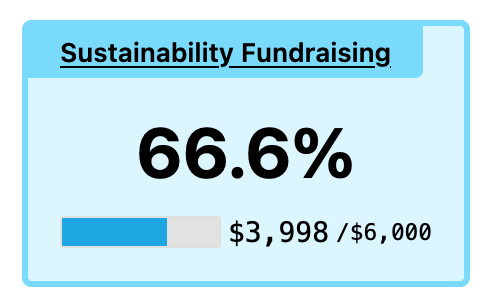
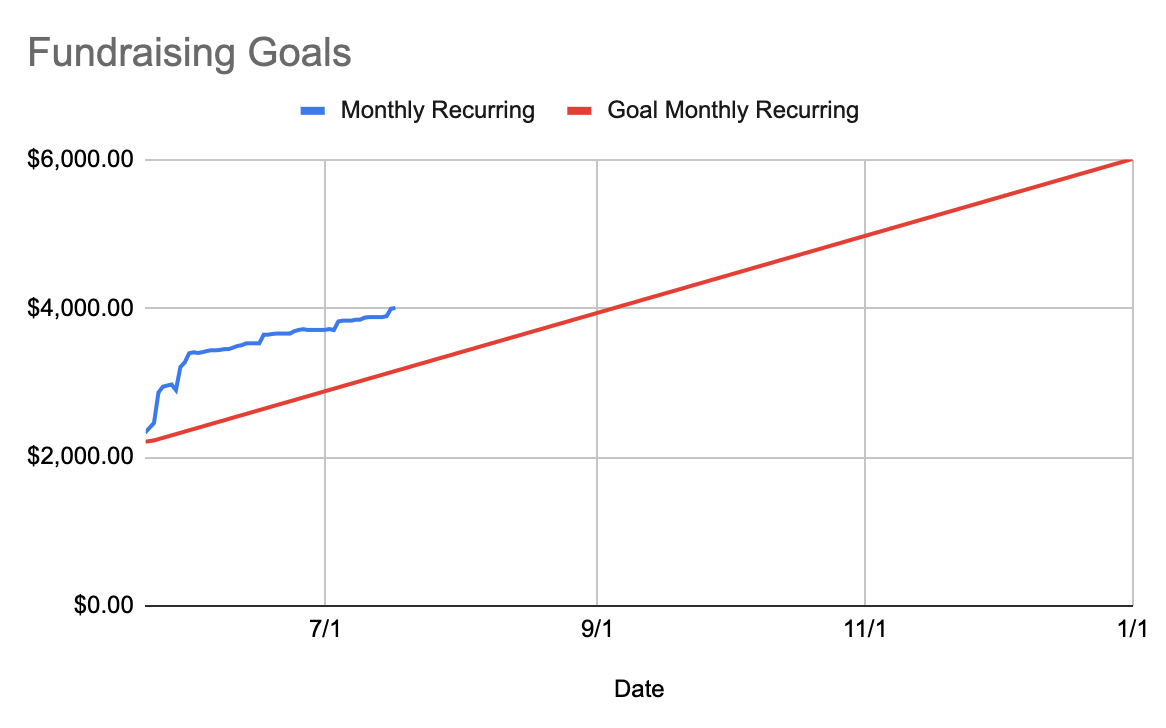
Very important news: @eleventy’s sustainability fundraising goal currently at 66.6%
https://www.11ty.dev/blog/sustainability-fundraising/
Thank you everyone! We still need your help but we’re on track to make 11ty sustainable in 2024!
Zach Leatherman 3 replies 35 likes18 reposts Original on MastodonThere are incredible parallels between the failure modes of smart home technology and modern web site architecture:
When the power goes out 🤝 When JavaScript fails
My smart lock failed and I’m locked out of my house 🤝 This form button doesn’t submit
The company went out of business and now this {smart device 🤝 JavaScript framework} isn’t receiving updates and poses a security risk
Zach Leatherman 35 replies 127 likes66 reposts Original on MastodonSafari 17.x has made improvements to their private browsing mode, notably enabling a default content blocker, removing known tracking query params from link URLs, and encrypted DNS.
Read more: https://webkit.org/blog/15697/private-browsing-2-0/
via @wilander
Zach Leatherman 16 likes3 reposts Original on Mastodon@beep side note I wonder if you might give me access to your repo to debug that v2->v3 build performance issue? My hunch is that it’s because of the extra overhead of the inputpath plugin (the plugin right, not the filter?)
@5t3ph hey stephanie! I see you’re speaking at web unleashed! I have kind of a weird question—are you covering your own expenses for that? They asked me to speak and want me to cover my own flight 😬
“There’s always money in the banana stand JavaScript server runtimes”
Zach Leatherman 3 replies 20 likes Original on Mastodonthis photo seems poetically accurate
(via https://www.sfchronicle.com/realestate/article/elon-musk-x-sublease-s-f-headquarters-19568418.php and @keith)

Zach Leatherman 1 reply 10 likes Original on MastodonWhat’s the latest writing/research/best-practices on bundling versus code splitting? Large requests versus splitting into smaller ones?
Hoping for something a bit more nuanced than “reducing download size is good” or “reducing network count is good.”
Zach Leatherman 24 replies 10 likes2 reposts Original on Mastodoncasually wearing my golden girls shirt and some lady just asked me to name one of their songs??
Zach Leatherman 12 replies 14 likes2 reposts Original on Mastodon