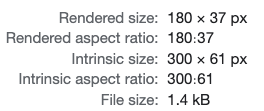
I feel like the reported <img> aspect ratios in this Chrome DevTools tooltip could be… improved 😅
 Zach Leatherman 1111 replies 1111 likes Original on Mastodon
11 replies
@zachleat I assume it reduces down to the lowest whole number ratio?
@mknepprath Maybe! With this information I can tell that it doesn’t match but it isn’t very useful to know the magnitude of error
@zachleat @mknepprath it's gotta be this. I wonder what the solution is? If they were to display it as X:1 or 1:X ratio, the values would be 10 digits long (not including decimal point).
Maybe they could show both aspect ratios next to each other, and have the "broken link" icon between them to signify they aren't the same?? Showing reduced to 1:X could be a user option?
@zachleat Gotta stop sizing with primes, man.
@Meyerweb this is the next.js hello world 😅
@zachleat 37 and 61 are primes so don’t think it’s possible in that example
@andydavies I mean, I understand why they did it—I just don’t think it’s particularly useful when you’re trying to gauge the magnitude of the difference
@zachleat @andydavies Ah, so instead of simplifying each aspect ratio separately, you'd rather expand them both to a common denominator?
Rendered aspect ratio: 900:185
Intrinsic aspect ratio: 900:183Yes, that is more useful. In this case, anyway. Would need a bit of code to figure out if normalizing to the lowest common multiple of the width or the height would be simpler.
Or just:
Rendered aspect ratio: 4.8648648 : 1
Intrinsic aspect ratio: 4.9180328 : 1Which is not so elegant, but OK.
@AmeliaBR @andydavies yeah! another similar thread here too: https://fediverse.zachleat.com/@zachleat/110305147163479708
@zachleat haha! Yeah I noticed that too. In Polypane when the aspect ratio ends up being the dimensions of the image or box, I just hide them.