to follow up, I did go through the Create a Next.js app tutorial https://nextjs.org/learn/basics/create-nextjs-app and it does collect telemetry by default without mention of data collection via the command line or otherwise.
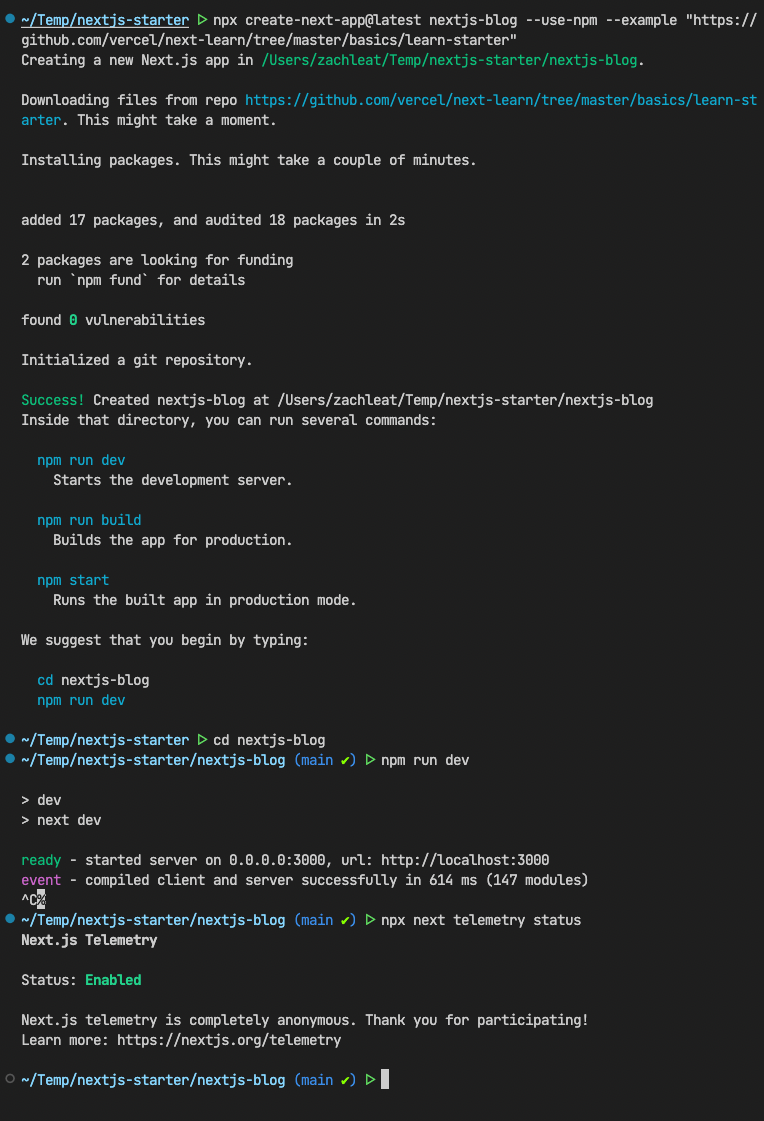

~/nextjs-starter ᐅ npx create-next-app@latest nextjs-blog --use-npm --example "https://github.com/vercel/next-learn/tree/master/basics/learn-starter" Creating a new Next.js app in /Users/zachleat/Temp/nextjs-starter/nextjs-blog. Downloading files from repo https://github.com/vercel/next-learn/tree/master/basics/learn-starter. This might take a moment. Installing packages. This might take a couple of minutes. added 17 packages, and audited 18 packages in 2s 2 packages are looking for funding run npm fund for details found 0 vulnerabilities Initialized a git repository. Success! Created nextjs-blog at /Users/zachleat/Temp/nextjs-starter/nextjs-blog Inside that directory, you can run several commands: npm run dev Starts the development server. npm run build Builds the app for production. npm start Runs the built app in production mode. We suggest that you begin by typing: cd nextjs-blog npm run dev ~/nextjs-starter ᐅ cd nextjs-blog ~/nextjs-starter/nextjs-blog (main ✔) ᐅ npm run dev > dev > next dev ready - started server on 0.0.0.0:3000, url: http://localhost:3000 event - compiled client and server successfully in 614 ms (147 modules) ^C% ~/nextjs-starter/nextjs-blog (main ✔) ᐅ npx next telemetry status Next.js Telemetry Status: Enabled Next.js telemetry is completely anonymous. Thank you for participating! Learn more: https://nextjs.org/telemetry